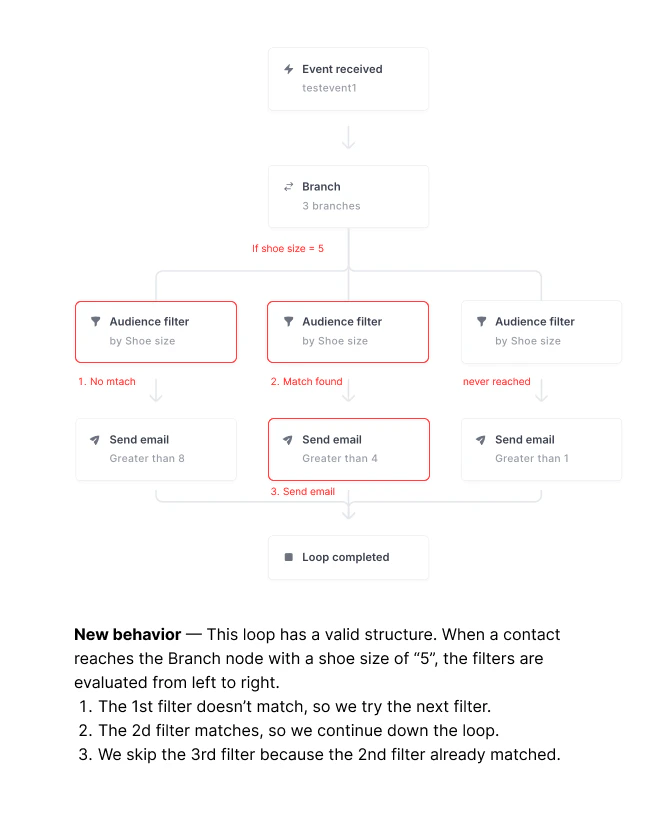
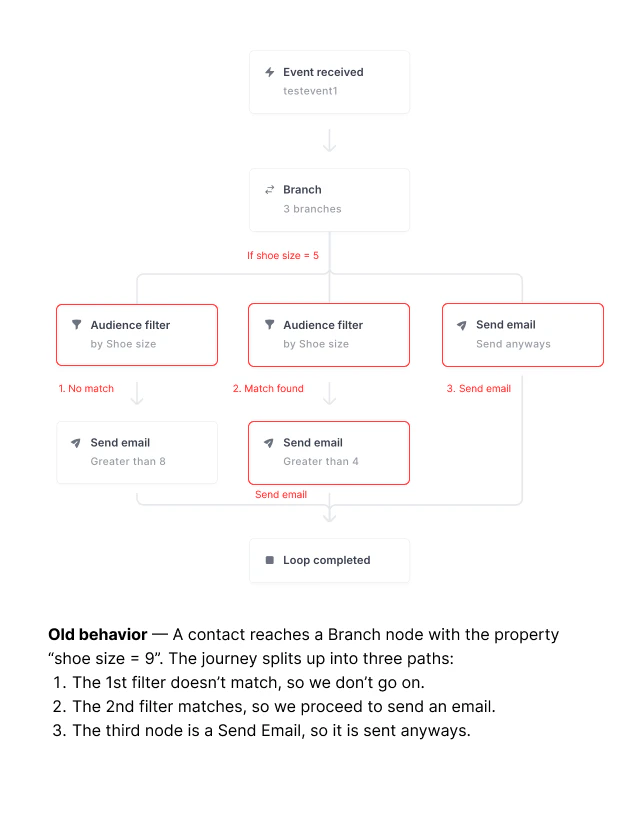
We’re simplifying the logic of how Branch nodes work in the loop builder. Previously, a contact’s journey would split into parallel paths after a Branch node. We realized customers really just wanted “if-else” logic where only a single path gets selected.Documentation Index
Fetch the complete documentation index at: https://loops.so/docs/llms.txt
Use this file to discover all available pages before exploring further.
How does the new branch node work?
- Audience Filters are evaluated from left to right.
- The contact’s journey proceeds after the first matching Audience Filter is found.
- All remaining filters after the first match are skipped.
- You can create a default path by setting the right-most audience filter node to include your whole audience (i.e. not setting a filter) so that any contact will match. In this way, if none of the earlier filters match, the contact would go down this “default” branch.
What are the main differences from the old branch node?
- A contact proceeds to the first matching filter only, instead of all matching filters.
Deprecated branch node logic
The previous logic would send contacts who matched multiple filters down multiple parallel branches.This logic is still supported in branch nodes that haven’t been upgraded yet.
New branch node logic
The new logic for new branch nodes means that contacts will only follow the first branch they match.The new logic is the default in new branches added to loops.